100.000 Fotos.
Sofort da.
FlashView ist ein schneller, schlanker Foto-Viewer - gebaut für Fotografen, die riesige Archive sichten und aussortieren.
60 Tage gratis testen, bei Gefallen gerne kaufen
Der schnelle Bildbetrachter für Windows: Einen Ordner mit Tausenden Fotos öffnen, flüssig durchscrollen. Keeper mit einem Tastendruck bewerten, Ausschuss markieren, auf das Wesentliche herunterfiltern - und was übrig bleibt, gleich hier bearbeiten und exportieren.
Schnell genug für 100.000+ Fotos. Bewerten mit einem Tastendruck - einzeln oder Tausende auf einmal. Non-destruktiv bearbeiten, ohne das Original anzufassen. Standard-XMP, lesbar in Lightroom, Bridge und Capture One.
Ein Tool für alles
Von der Speicherkarte bis zum fertigen Bild - ohne Katalog, ohne Abo, ohne Wartezeit.
- ImportierenVon der Karte in Tages-Ordner - Vorlagen, Umbenennen, geprüfte Kopie.
- Sichten100.000 Fotos durchblättern, ohne zu warten.
- AussortierenSterne, Farben, Pick/Reject - ein Tastendruck pro Bild.
- OrganisierenFiltern, sortieren, gruppieren, in Ordner kopieren.
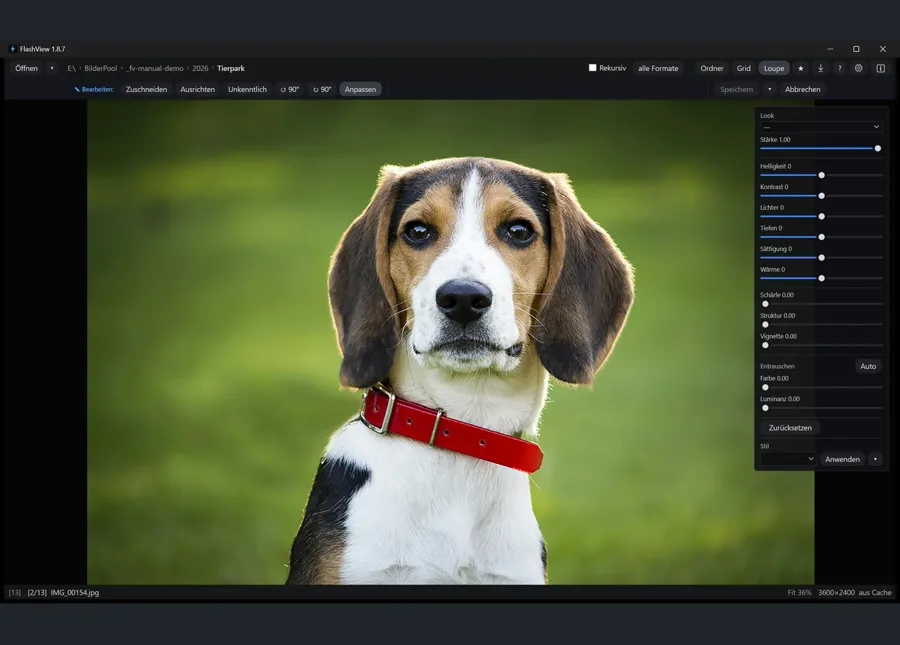
- BearbeitenNon-destruktiv: Regler, Looks, Zuschnitt, Schwärzen.
- ExportierenFertige JPEGs in einen Ordner - oder rüber nach Photoshop.
Schritt für Schritt im Handbuch: der ganze Weg von Anfang bis Ende →
Was es besonders macht
Gebaut für riesige Ordner
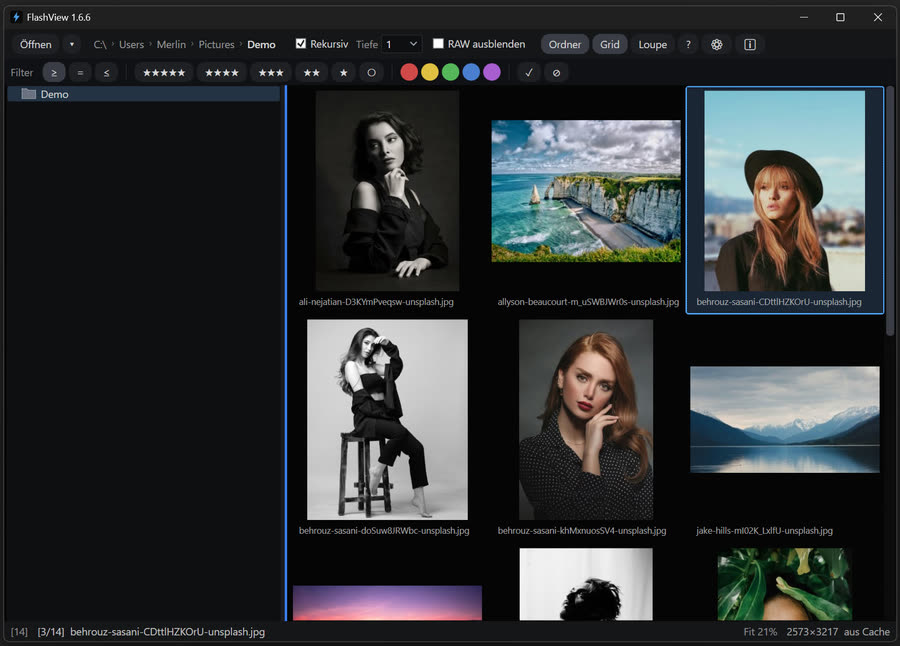
Kein Warten aufs Indexieren - Ordner öffnen und sofort losscrollen. Bleibt auch bei Archiven mit 100.000+ Fotos flüssig.
Blitzschnell
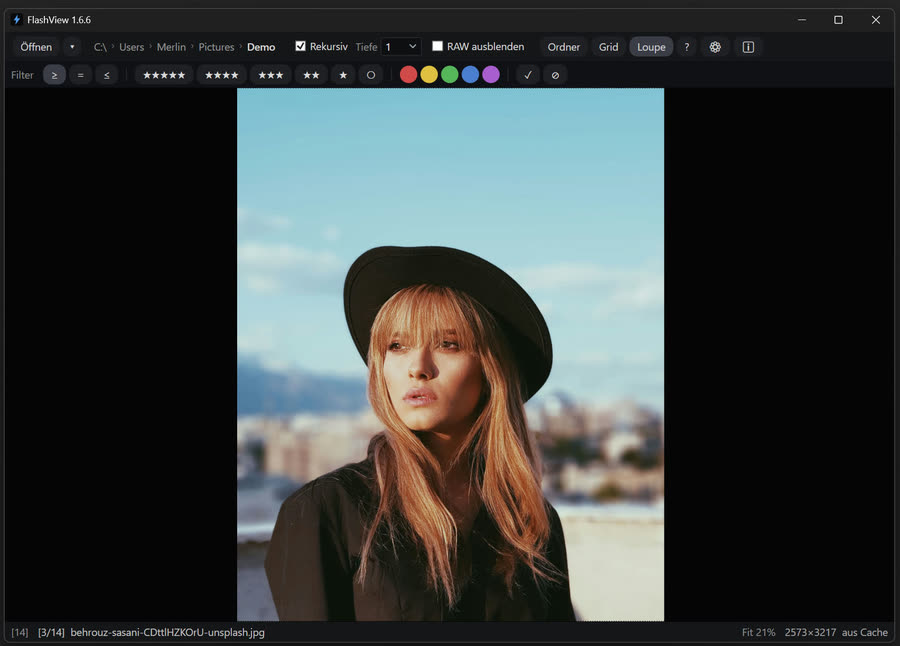
Pfeiltasten, Mausrad, Scroll - jede Eingabe zeigt das nächste Bild ohne spürbare Verzögerung, auch bei großen, hochauflösenden JPEGs. Das ist das Flash im Namen.
Nativer Windows-Workflow
Rechtsklick auf ein Bild → Öffnen mit FlashView → sofort in der Loupe, der ganze Ordner steht bereit. G fürs Grid.
Endlos durchs Archiv
Rekursiv durch alle Shootings - kein Katalog, kein Warten. Foto-Ordner öffnen und in Echtzeit durch alles scrollen. Über die Gruppen-Tiefe steuerst du, wie die Shootings im Grid gestapelt werden - per Klick in den Deep-Dive.
Für wen?
Egal ob Hobby oder Pro: dein Foto-Archiv öffnen und in Echtzeit durch alle Shootings scrollen - kein Tool macht das so. Darauf aufbauend passt FlashView besonders zu diesen Workflows:
Hochzeit
2.000+ Bilder pro Event, der Kunde will Highlights bis Mittwoch. Batch-Rating in Hundertern, Color-Labels nach Workflow-Stage, Übergabe an Lightroom via XMP.
Workflow-Guide: Hochzeits-Selektion
Portrait & Studio
Schärfe-Check bis aufs Pixel, der Kunde schaut mit. 1:1-Zoom fürs Auge-Fokus-Check, F11 schickt das aktuelle Bild auf den Zweit-Monitor fürs sofortige Kunden-Review.
Workflow-Guide: People & Portrait
Tier & Sport
Burst-Serien à 30 Bildern, nur eines ist scharf. Schnelles Scrollen durch ähnliche Frames, 1:1-Zoom für den scharfen Treffer, X für Reject im Batch.
Features
- XMP-Metadaten, die jedes Tool liestSterne, Farbmarken und Flags als Standard-XMP - lesbar in Lightroom, Bridge, Capture One.
- Im Stapel bewerten1.000+ Dateien auswählen,
3drücken, fertig.Strg+Zmacht den letzten Batch rückgängig. - Auto-Weiter beim CullenMit Feststelltaste aktiviert springt jede Bewertung zum nächsten Bild - ein Tastendruck, eine Entscheidung, ein Bild weiter.
Strg+Zspringt zum bewerteten Bild zurück. Gleicher Reflex wie in Lightroom und Photo Mechanic. - Live filternNach Sternen (mindestens/genau/höchstens), Farbmarke, Pick, Reject, Zeitraum - oder RAW-Dateien ganz ausblenden.
- Vergleich nebeneinanderMit
Czwei Bilder nebeneinander legen und aus einer Serie den schärfsten Treffer picken - eine Seite bleibt aktiv fürs Bewerten, die andere hält als Referenz. - Histogramm auf KnopfdruckMit
Hin der Loupe ein RGB- und Luminanz-Histogramm einblenden und die Belichtung direkt beim Sichten prüfen. - Direkt von der Karte importierenAlle Aufnahmen mit
Strg+Ivon der Karte holen: auf Wunsch ein Ordner pro Aufnahmetag, Nachtgrenze um 4 Uhr, damit das Konzert über Mitternacht ein Ordner bleibt, und Umbenennen nach eigenem Muster. Jede Datei wird nach dem Kopieren zurückgelesen und per Prüfsumme verglichen. - Bearbeiten, ohne das Original zu verlierenMit
Ein den Bearbeiten-Modus: Zuschneiden, Ausrichten, Drehen und Schwärzen - genug, um ein Bild direkt pressefertig zu machen. Durchgehend non-destruktiv: Das Original bleibt unangetastet, jede Änderung ist reversibel, bei JPEG wie bei RAW. - Looks und ReglerMitgelieferte Looks und eigene gespeicherte Stile, dazu Regler für Belichtung, Kontrast, Farbe, Entrauschen und Schärfe. Einen Stil im Grid auf eine ganze Auswahl anwenden - oder einzeln in der Loupe.
- Rüber nach Photoshop und zurückEin Bild als flaches PSD übergeben, dort arbeiten, speichern - FlashView erkennt die Änderung von selbst und zeigt sie sofort. PSD-Dateien werden auch direkt angezeigt.
- Auswahl exportierenEine Auswahl mit
Strg+Eals gerenderte JPEGs in einen Ordner schreiben - oder die unveränderten Originale per In Ordner kopieren aus dem Kontextmenü. - Keyboard-first0-5 bewerten, P Pick, X Reject, G/L Grid/Loupe, Tab schaltet um, F Vollbild, I EXIF, Entf Papierkorb. Jede Aktion auch über viele Dateien gleichzeitig - mit
Strg+Zzurück. F1 zeigt die ganze Liste. - Zu jedem Ordner springen
Strg+Fsucht Ordnernamen im ganzen Baum und bringt dich direkt hin. - Sortieren und gruppierenName oder Datum, auf-/absteigend. Elternordner nach Shoots gruppieren, mit konfigurierbarer Tiefe.
- Fünf FarbmarkenRot, Gelb, Grün, Blau, Lila - als Standard-XMP.
- Breiter RAW-SupportCanon (CR3, CR2), Nikon (NEF, NRW), Sony (ARW, SR2), Adobe DNG, Fujifilm (RAF), Panasonic (RW2), Olympus (ORF), Pentax (PEF), Hasselblad (3FR, FFF), Samsung (SRW).
- Zoom und Details1:1-Pixelansicht, an Bildschirm anpassen, Pan.
- Zoom fixierenZoomstufe festhalten und beim Durchblättern einer Serie am selben 1:1-Ausschnitt bleiben - Schärfe-Peeping ohne jedes Bild neu zu zoomen.
- Zweit-Monitor-Modus
F11öffnet auf einem zweiten Monitor ein Vollbild des aktuell ausgewählten Bildes - du arbeitest weiter im Grid oder in der Loupe auf dem Hauptbildschirm, während der Kunde auf dem zweiten mitschaut. - SlideshowMit
Släuft die Slideshow durch deine aktuelle Auswahl oder Filterung - Geschwindigkeit per Hover-Popup einstellbar, läuft in der Loupe, kombinierbar mitFfür Vollbild oderF11für Zweit-Monitor-Projektion. - EXIF-PanelKamera, Objektiv, Brennweite, Blende, Verschlusszeit, ISO, Datum, Pixelgröße, Fotograf, Copyright - in der Loupe mit
Ieinblendbar. - Nach EXIF filtern und sortierenEinen Ordner nach Kamera, Objektiv, ISO, Blende, Verschlusszeit oder Brennweite eingrenzen - und danach sortieren. FlashView liest die Metadaten im Hintergrund ohne Geschwindigkeitsverlust; einmal in den Einstellungen aktivieren.
Systemanforderungen
Minimum
- OS
- Windows 10 21H2 oder Windows 11, 64-Bit
- CPU
- 4 Kerne
- RAM
- 8 GB
- Speicher
- SATA-SSD - HDDs werden nicht unterstützt
Empfohlen
- OS
- Windows 11, 64-Bit
- CPU
- 8+ Kerne
- RAM
- 16 GB
- Speicher
- NVMe-SSD, ≥ 1 GB/s sequentiell
Häufige Fragen
Warum ist FlashView so schnell?
Es nutzt Techniken aus der Game-Entwicklung, um schnell zu sein - kein klassischer Dokument-Viewer. Es lädt immer nur, was du gleich siehst - einen Wimpernschlag bevor du es siehst -, verwendet Speicher wieder, statt ihn neu anzulegen, und dekodiert die schwere Arbeit auf Hintergrund-Threads mit striktem Zeitbudget, damit die Oberfläche nie einfriert. Das Grid ist virtualisiert: es existieren nur die Kacheln, die auf dem Bildschirm sind. Nichts davon ist exotisch - es ist ganz normales Game- und Demoscene-Handwerk, das die meisten Foto-Tools nie angewandt haben, weil sie nie für 100.000 Dateien in einem Ordner gebaut wurden. Und bei allem Game-Engine-Innenleben bleibt es eine grundsolide, brave Windows-Anwendung: sauber in den Explorer integriert („Öffnen mit“ und normale Dateiverknüpfungen) und höflich im Multitasking neben Lightroom & Co. - keine Vollbild-Übernahme, kein ausufernder Speicher.
Wann wird FlashView langsam?
Zwei Bremsen sind hart: HDDs werden nicht unterstützt - FlashView arbeitet stark parallel, Festplatten-Köpfe können das nicht bedienen. Und schwache Hardware: alte CPU, wenig RAM. Große, hochauflösende JPEGs auf einer schwachen Kiste werden irgendwann spürbar zäh - meist immer noch flotter als andere Tools, aber das ist dann Physik.
Werden meine Daten irgendwohin geschickt?
FlashView arbeitet rein lokal. Einziger Netzwerk-Call: der Update-Check, 1× am Tag - er erinnert und informiert dich freundlich, wenn eine neue Version da ist.
Warum lokal, wo doch alles in die Cloud wandert?
Weil die Rechenleistung längst auf deinem Schreibtisch steht. Der Trend lädt das Rechnen in die Cloud aus - obwohl die Kiste vor dir schnell und meist im Leerlauf ist. FlashView geht den umgekehrten Weg und nutzt diese Leistung wieder lokal: kein Upload-Warten, kein Umweg über ferne Server, keine Monatsgebühr für etwas, das in Millisekunden auf Hardware läuft, die du schon bezahlt hast. Die Cloud ist super zum Teilen - 100.000 Bilder aussortieren ist ein Job für die Kiste vor dir.
Ist FlashView code-signiert?
Ja. Installer und Portable-ZIP sind digital signiert vom verifizierten Herausgeber Mathias Mischler, dessen Identität von Microsoft (Trusted Signing) verifiziert wurde. Bei brandneuen Versionen zeigt Windows eventuell einmalig den Hinweis „Der Computer wurde durch Windows geschützt“, bis sie Download-Reputation aufgebaut haben; dann einfach Weitere Informationen → Trotzdem ausführen. Du kannst die Signatur selbst prüfen: Rechtsklick auf die Datei → Eigenschaften → Digitale Signaturen.
Wie werden Ratings gespeichert?
Als Standard-XMP. In JPEGs direkt in der Datei, bei RAW als XMP-Sidecar daneben. Keine proprietäre Datenbank, nichts, aus dem du später nicht rauskommst.
Importiert FlashView Lightroom-Kataloge?
Nein. FlashView arbeitet ausschließlich auf Ordnern - keine Datenbank, kein Katalog, nichts zu importieren. Ratings werden als XMP gespeichert: bei JPEG direkt in die Datei, bei RAW als XMP-Sidecar daneben. Lesbar aus und in jedem XMP-kompatiblen Tool (Lightroom, Bridge, Capture One).
Ersetzt FlashView Lightroom?
Für den größten Teil eines Shoots ja. FlashView deckt inzwischen die ganze Kette selbst ab: von der Karte importieren (ein Ordner pro Aufnahmetag, Umbenennen, per Prüfsumme geprüfte Kopie), sichten, aussortieren, non-destruktiv bearbeiten und exportieren - ohne Katalog, ohne Datenbank, ohne etwas zu importieren. Sichten und Aussortieren sind genau die Schritte, bei denen Lightrooms Bibliothek am langsamsten ist, und dafür ist FlashView gebaut. An Lightroom übergibst du, wenn du dessen Tiefe brauchst: Objektivprofile, Masken, extreme Rettungsaktionen, Katalog-Verwaltung. Dank Standard-XMP sind deine Sterne, Farben und Fahnen dort sofort da. Muss ein einzelnes Bild nach Photoshop, geht es als PSD hinüber und kommt automatisch erkannt zurück. Und wer mit Modellen oder externen Bewertern aussortiert: StarRate (unser Nextcloud-Plugin) spielt deren Bewertungen ins selbe XMP zurück. Der ganze Weg, Schritt für Schritt → Ausführlicher Vergleich mit Lightroom →
Farb-Bewertungen werden nicht erkannt?
Lightroom Classic speichert Farb-Labels in der UI-Sprache: deutsches Lightroom erwartet „Rot, Gelb, Grün …“, alle anderen Tools (englisches Lightroom, Bridge, digiKam, Capture One, darktable) die englischen Werte. Schreibt FlashView die falsche Variante, kennt das Tool das Label nicht - Lightroom zeigt eine weiße Fahne, andere Tools zeigen gar nichts oder die falsche Farbe. Fix: Einstellungen → Allgemein → Metadaten → Farb-Bewertungen kompatibel mit auf dein Haupttool stellen - beim ersten Start rät FlashView nach UI-Sprache. Lesen kann FlashView ohnehin beides. Bewerten und Markieren im Handbuch →
RAW-Performance?
Für die RAW-Vorschau wird das eingebettete JPEG aus der RAW-Datei verwendet - nicht die volle RAW-Auflösung. Canon, Nikon und Sony sind umfassend getestet und laufen fast so schnell wie JPEG. Andere Formate (DNG, RAF, RW2, ORF, PEF, 3FR, FFF, SRW) funktionieren ebenfalls. Bewusste Entscheidung: für reine Sichtung und Bildbetrachtung mehr als ausreichend, und um Welten schneller als volle RAW-Dekodierung. Mehr zu RAW vs. JPEG →
Kann ich RAW-Dateien entwickeln?
Ja. Öffnest du ein RAW im Bearbeiten-Modus, entwickelt FlashView es mit einer echten RAW-Engine - demosaict, 16 Bit linear, Weißabgleich wie aufgenommen - und darauf gibt es Weißabgleich, Belichtung, Tonwertkurve und Sättigung, dazu Looks, Entrauschen und Detail-Regler. Unterstützt wird eine breite Auswahl an RAW-Formaten - Canon, Nikon, Sony, Fujifilm, Panasonic, Olympus, Pentax, Hasselblad, Samsung und Adobe DNG; welche genau, steht im Handbuch. Das erste Öffnen eines großen RAW dauert einen Moment (auf einer schnellen Maschine etwa eine Sekunde, auf einem Mini-PC länger), danach reagieren die Regler beim Ziehen. In die RAW-Datei selbst wird nie etwas geschrieben - das Rezept liegt daneben und ist jederzeit umkehrbar. Für Objektivprofile, Masken oder extreme Rettungsaktionen geht ein spezialisierter Konverter weiter. RAW entwickeln im Handbuch →
Was machen „Rekursiv“ und „Gruppen-Tiefe“?
Zwei verschiedene Dinge, häufig verwechselt.
Rekursion (Taste R): durchsucht alle Unterordner ohne Tiefenbegrenzung. Es gibt keinen Modus, der das limitiert - bewusste Entscheidung, denn ein Foto-Ordner enthält entweder die Bilder, die du sehen willst, oder nicht; die Verschachtelungstiefe ändert daran nichts.
Gruppen-Tiefe (Toolbar / Einstellungen): steuert die optische Gruppierung im Grid, nicht die Suche. Aktiv nur, wenn „Bilder nach Ordner-Hierarchie gruppieren“ in den Einstellungen eingeschaltet ist. Sie legt fest, welche Ordner-Ebene zum Trenner wird: bei Tiefe 1 stehen alle Bilder aus „2025/*“ zusammen in einem Block; bei Tiefe 2 bekommt jeder Shoot eine eigene Gruppe - alle Bilder von „Hochzeit-Müller“ landen beieinander im Grid, getrennt vom nächsten Shoot. Sie limitiert nicht, wie tief gesucht wird. Ordner und Gruppen im Handbuch →
Was bedeuten „Standard“, „Performance“ und „Hi-Res“ bei den Thumbnails?
Drei Stufen. Standard (480 px) ist die empfohlene Voreinstellung - scharfe Vorschauen bei ausgewogener Cache-Größe. Performance (320 px) ist besser für langsamere Rechner und braucht am wenigsten Speicherplatz. Hi-Res (640 px) liefert die schärfsten, detailreichsten Vorschauen - ideal für hochauflösende und 4K-Monitore, dafür mehr Cache-Speicher. Umstellen jederzeit über Einstellungen → Anzeige → Thumbnail.
Gibt es einen Cache?
Ja, einen Thumbnail-Cache - sonst müssten Vorschaubilder bei jedem Ansichts-Wechsel neu dekodiert werden. Der Cache liegt lokal und enthält nur generierte Vorschauen, keine deiner Bilder oder Daten. Größe siehst du in den Settings, dort lässt sich der Cache auch jederzeit bereinigen.
Farbmanagement / ICC-Profile?
FlashView arbeitet rein in sRGB - keine Profil-Konvertierung, keine Farbmanagement-Pipeline. Das ist vor allem eine Geschwindigkeits-Entscheidung.
Was bedeutet das Wolken-Symbol auf manchen Bildern?
Das Wolken-Symbol markiert Dateien, die aktuell nur in deinem Cloud-Speicher liegen (OneDrive, Nextcloud, Dropbox, iCloud …) und noch nicht lokal heruntergeladen sind. Um eine Vorschau zu erzeugen, müsste FlashView das Original erst herunterladen - deshalb bleibt das standardmäßig aus, sonst würde dein Cloud-Speicher beim Öffnen eines großen Ordners ungefragt Gigabytes ziehen.
Steuern kannst du das unter Einstellungen → Cloud-Thumbnails mit drei Modi:
Aus - Cloud-only-Dateien werden nie geladen (Voreinstellung, am sichersten).
Vorschau - lädt Thumbnails für eine begrenzte Anzahl Cloud-Dateien (2, 4, 6, 8 oder 12, einstellbar über „Vorschau-Anzahl“), damit du einen Eindruck bekommst, ohne alles zu ziehen.
Alle laden - holt jedes Cloud-Original, um Thumbnails zu erzeugen. Achtung: bei großen Foto-Bibliotheken werden das schnell viele GB Plattenplatz und Cloud-Traffic.
Welche Betriebssysteme werden unterstützt?
Windows - und derzeit ausschließlich Windows. Windows ist der mit großem Abstand verbreitetste Desktop, und genau dort steht die leistungsstarke Hardware - viele Kerne, viel RAM, potente GPUs -, die die meiste Zeit brachliegt. Genau diese vorhandene Leistung setzt FlashView ein, statt sie in die Cloud auszulagern. Darauf konzentrieren wir uns.
Hinter FlashView
FlashView wird von Mathias Mischler gebaut - Hobbyfotograf seit 15 Jahren. Die Idee entstand beim Testen anderer Foto-Tools für das Schwesterprojekt StarRate: alle waren bei großen Archiven mit rekursiver Ansicht zäh. Ein schneller Prototyp war auf Anhieb um Längen flotter - das war der Startschuss für FlashView. Die Geschwindigkeit ist kein Zufall: Seine Wurzeln liegen in der Demoscene auf C64 und Amiga; später hat er an einem kommerziellen Spiel mit Echtzeit-3D-Engine mitgearbeitet - einer Disziplin, in der es genau darum geht, aus normaler Hardware jede Millisekunde herauszuholen.
People- und Portrait-Fotografie: @merlin1.de auf Instagram →