
Overview
Image viewers for Windows: five programs and what each is good for
There is no ranking here, just the same for every program: what it is built for, and where it stops.
How this is sorted
There is no such thing as "the best image viewer", because the jobs are too different. Someone looking through thirty phone snapshots in the evening needs something other than someone who has to work through two thousand raw files after a wedding.
So for each program you get the question it was built to answer:
- Look at a single picture, fast
- Open many formats, including old and unusual ones
- Work through a grown archive and cull it
- Store ratings so that other programs can read them
- Make small corrections without losing the original
Windows Photos
What it is for: It is already installed. Double-click a JPEG, the picture is there, done. For phone snapshots, screenshots and anything you only want a quick look at, nobody needs more.
Where it stops: It does not show raw files on its own. You need the free Raw Image Extension from the Microsoft Store; after that, previews appear in Explorer and the files open, though a few formats stay out. And it is built as a viewer for single images, not as a tool for working through thousands while recording decisions along the way.
Take it if you want to look at photos and nothing else.
IrfanView
What it is for: The veteran. Tiny, starts instantly, and through its plugin pack it opens practically every file format that has ever existed. Its batch processing has grown over decades and can do things more modern programs never thought of. As the default viewer for whatever gets double-clicked, it is still a sensible choice.
Where it stops: Raw needs the plugin pack, and it develops the file in full instead of using the finished preview that sits inside every raw. That is stated in its own FAQ, and it means several times the work per image. There is no rating in the sense of a photo workflow.
Take it if you need a tool for every format, and a lean one at that.
FastStone Image Viewer
What it is for: The most complete of the free ones. It reads raw natively and broadly - CR3, NEF, ARW, RW2, DNG - is actively maintained, and since version 8.4 it handles JPEG XL and PDF as well. Comparing up to four images side by side is a proper tool, and the slideshow is the best in this field.
Where it stops: Its star ratings land in its own database, not in the file and not in an XMP file beside it. No other program can read them. If you move on to Lightroom or Bridge after culling, you start over there.
Take it if you want a lot of features for free and your ratings are not needed anywhere else.
XnView MP
What it is for: The most capable of the free programs. Over 700 formats, a category tree for your own keywords, and it handles metadata properly: stars, color labels and keywords are written as XMP, readable in Lightroom and Bridge, hierarchies included. If you want to open up your archive through a keyword vocabulary, this is the place.
Where it stops: Watch the edition - MP is the current rewrite, Classic the old 32-bit program. And note where things live: stars and color labels go straight into the file, categories go into the catalog. That catalog has to be written back into the images deliberately; the documentation itself warns that a lost database means lost keywords. Out of the box the interface also shows a great deal at once - that can be configured, you just have to know where.
Take it if you want to manage and tag, and are willing to set things up.
FlashView
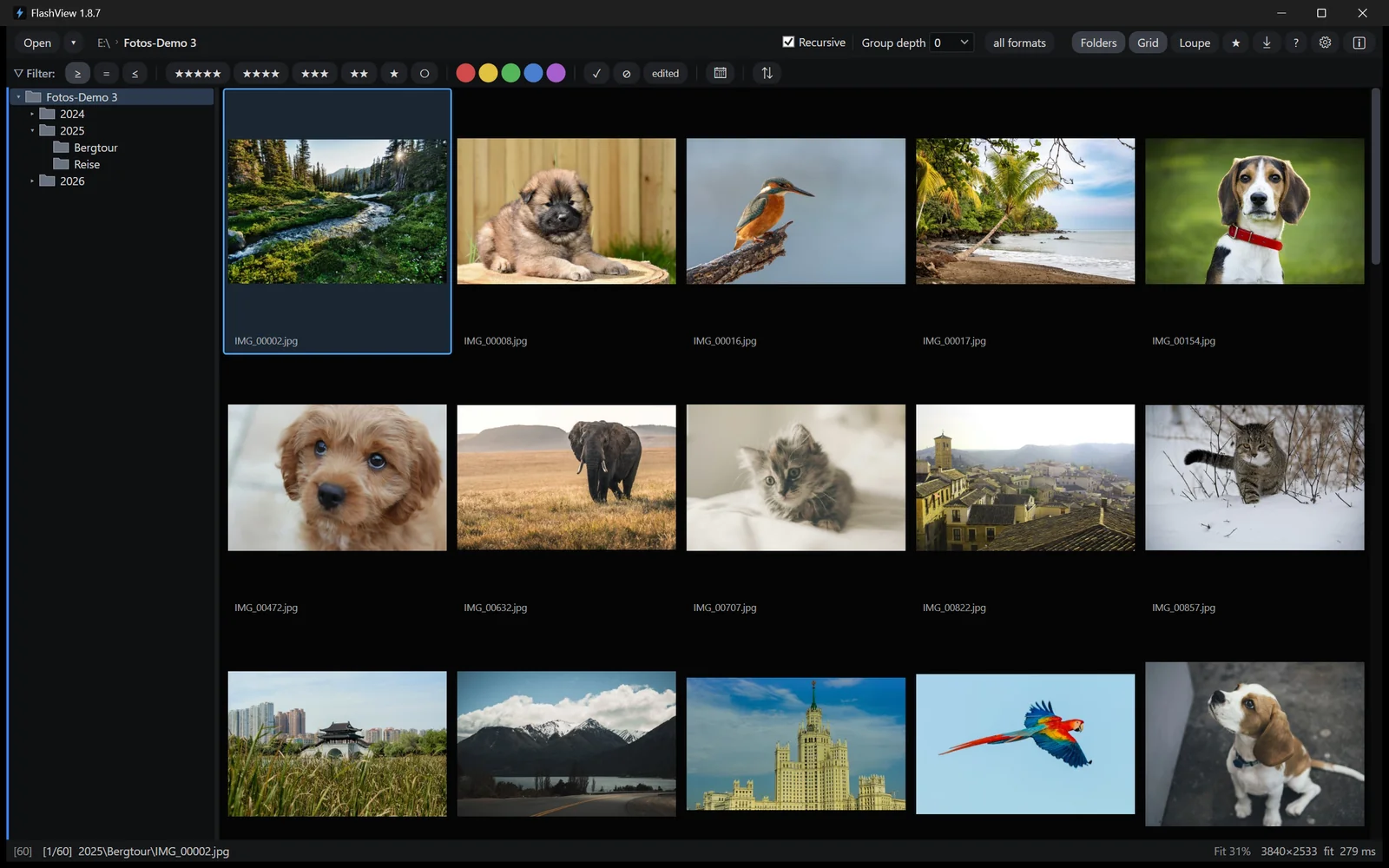
What it is for: This one is ours, so it is kept short here. It is built for the case the other four are not measured on: a grown archive, a hundred thousand shots, every subfolder at once. Point at a folder, the picture is there - no catalog, no reading-in first. While you browse it shows the preview that sits inside every raw anyway, so a raw costs no more time than a JPEG. On our test machine that comes to around thirty images per second - as fast as you can hold the arrow key down. FastStone, IrfanView and XnView MP managed two to three in the same folder. Ratings land immediately as standard XMP beside the file, plus card ingest with your own templates for folders and filenames, and non-destructive editing for the quick fix.
In the grid, the pictures are what you see. Filtering runs across the whole holding rather than folder by folder: by rating, color label, camera, lens, capture date. At a hundred thousand shots that is the difference between searching and finding.
Where it stops: It does not reach the format range of IrfanView and XnView. It cannot do hierarchical keywords. It costs 39 euros, where four of the five here are free. It runs on Windows.
Take it if your archive has grown beyond what the viewer you are using can handle - or if you work with it daily and have noticed what half a second of waiting per image costs across two thousand shots. Of the five here, it is the only one built for that case.
Which one for whom
| If you… | then | because |
|---|---|---|
| just want a quick look at a picture | Windows Photos | it is there, it is enough, it costs no click |
| need to open a format nobody knows | IrfanView | the plugin collection is unmatched |
| want a lot of features for free | FastStone | raw, compare, slideshow, all included |
| want to manage and tag | XnView MP | categories and clean XMP |
| work through a large archive and cull it | FlashView | that is what it is built for |
| work with it daily and speed matters | FlashView | no catalog, no waiting per image |
| need the whole chain: card, selection, editing, export | FlashView | the others cover parts of it |
Two things that are easy to miss
Where your ratings end up. Stars are only worth something if another program can read them. XnView MP and FlashView write them as XMP into or beside the file. FastStone keeps them to itself. With Windows Photos and IrfanView the question does not arise.
How big your pictures have become. When most of these programs earned their reputation, a JPEG was a few hundred kilobytes. Today a mid-range camera delivers forty megapixels. If your trusted viewer feels slow, you are not imagining it - the job changed, not the program.
In more detail
Three of these comparisons have their own article here: FastStone and IrfanView in detail, for anyone coming from Adobe the Lightroom alternative without a subscription, for professionals Photo Mechanic compared, and for everyone who misses the fast viewer of old, the ACDSee alternative.
FlashView itself runs for 60 days, complete and free, with no registration. Go to the download - after that a license is a one-time 39 euros.